


ChimeChat: AI Character Chat
4.7518.00 Reviews
App Specs
- Version
- 1.0.4
- Updated On
- License
- Free
- Downloads
- 100,000+
- Developer
- Hamlikyger
- Categories
- Entertainment
- Platform
- Android
Screenshots




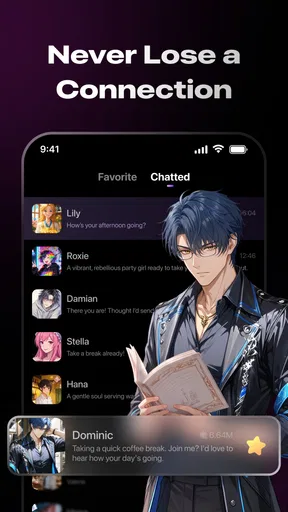
 Analysis by AppCompare
I approached ChimeChat: AI Character Chat as an entertainment app rather than a productivity tool, and that distinction matters from the first conversation. Its appeal is the chance to open a relaxed chat with an AI character and guide the exchange in a direction that feels personal, playful, or simply useful for passing time. The app is free, comes from Hamlikyger, and is intended for mature users, so I would treat it as a private conversational space for adults rather than a general-purpose assistant for the whole family.
The basic idea is easy to understand: choose a conversational direction, write naturally, and see how the character responds. In my experience, the quality of the session depends less on sending long messages and more on establishing the mood early. A short opening that explains what I want from the conversation usually works better than immediately asking several unrelated questions. That simple habit makes the experience feel less random and gives the chat a clearer rhythm.
How I use ChimeChat for more consistent conversations
I keep conversations more consistent by giving each one a simple anchor: a topic, a tone, and the kind of reply I want. When a session starts to drift, I briefly restate only the detail that matters instead of rebuilding the whole setup. That approach makes longer chats easier to steer, and it also helps me notice when a fresh conversation would be more useful than trying to rescue an old thread.
Start with a clear conversational baseline
My normal workflow begins with a small purpose. I might want a light role-play exchange, an imaginative conversation, a friendly distraction during a break, or a place to explore an idea aloud. I state that purpose in the first few messages instead of expecting the character to guess it. For example, I might say that I want a relaxed conversation with short replies, or that I want the character to challenge my assumptions rather than agree with everything.
This is one of the most useful practical lessons with an AI chat app: the opening message acts like a soft set of instructions. It does not guarantee perfect consistency, but it gives the conversation a recognizable shape. If I only write “hello” and then change subjects repeatedly, the exchange can become less focused. If I establish the tone, pacing, and subject, I get a more enjoyable session with less corrective typing.
I also keep one topic active for a while before changing direction. When I jump from a fictional scene to advice and then to casual jokes in a few messages, the character may follow the latest request but lose the atmosphere that made the conversation interesting. A better approach is to close one thread deliberately, then introduce the next one. That small pause makes the chat feel more controlled and reduces the need to repeat myself.
A realistic everyday use is a quiet evening when I want entertainment without committing to a video, game, or social conversation. I can spend a few minutes building a fictional scenario, ask the character to continue it, and then steer the scene toward a different outcome. Compared with scrolling through short videos, this feels more active because I am shaping what happens. Compared with messaging a friend, it is more immediate and available, but it does not provide the genuine human understanding or shared history of a real relationship.
Worth Reading Before You Choose

EA SPORTS FC Mobile 26 Is a Bigger Football Game, but It Takes Time

Flipboard Shows What News Apps Must Do Beyond the Feed

Switching to Android Auto Means Rethinking Your Driving Routine

Google Calendar Makes a Crowded Week Easier to Manage

Ludo King Makes the Most of the Minutes Between Plans

Baby Panda World Brings Quick Play to Modern Phones, but Its Game Library Feels Busy
Use short corrections instead of restarting
When a reply moves in the wrong direction, I find it more efficient to correct the specific issue than to abandon the conversation. A message such as “keep the same setting, but make the tone calmer” is clearer than starting over with a completely new prompt. Likewise, if replies become too detailed, I can ask for shorter responses; if the character becomes too agreeable, I can request more disagreement or a different perspective.
This approach is especially helpful during longer creative exchanges. Restarting may remove the unwanted detail, but it also removes the useful context that has already developed. Small corrections preserve the parts that are working. I would not expect every correction to be followed perfectly, so I treat the process as steering rather than programming. The app is entertainment built around conversation, not a precise rule engine.
Keep expectations realistic
The natural-chat premise is attractive, but “natural” does not mean human. ChimeChat can provide an engaging back-and-forth, yet the experience still depends on generated responses. A warm or convincing message should not be mistaken for personal awareness, professional judgment, or a real emotional relationship. I enjoy the app most when I treat it as an interactive fiction and conversation space, not as a replacement for people.
That distinction also answers an important question about suitable use. I would use it for creative prompts, casual company, character-based entertainment, and practicing how to express an idea. I would not rely on it for medical, legal, financial, emergency, or deeply personal decisions. If a subject has serious consequences, a qualified person or a trusted real-world source is a better choice.
Settings and habits worth checking before settling in
Because the app is aimed at mature users, I pay attention to the kind of conversation I am initiating and to who might be able to see my screen. The mature age classification is not a promise that every exchange will suit every adult, and it is certainly not a reason to hand the phone to a child. I recommend using it in a private setting and thinking before entering identifying information into any conversational app.
I also check the app’s available conversation controls when I begin using it, rather than assuming the default experience will match my preferences. The most useful settings are the ones that affect how I want to interact: whether I prefer a slower, more thoughtful exchange or quick replies, and whether I want a playful or more grounded tone. Where the app presents choices, I make them deliberately instead of changing several things at once, because that makes it easier to understand which adjustment improved the session.
One practical limitation is that an AI character chat does not always make its internal context visible. I cannot assume that every earlier detail will remain equally important throughout a long conversation. For that reason, I occasionally restate the key facts of a fictional scenario in one compact message. This is not elegant, but it is more reliable than expecting the app to preserve every detail indefinitely.
I also avoid placing sensitive real-world information into a chat merely because the conversation feels friendly. I can create fictional names, locations, and circumstances for a role-play without exposing private details. That habit improves both privacy and creativity: invented details give the character material to work with while keeping the session separate from my actual life.
Faster patterns for repeat use
Experienced use is less about writing elaborate prompts and more about developing repeatable openings. I keep a few mental templates: one for a short casual chat, one for collaborative storytelling, and one for asking the character to challenge an idea. Each template includes the intended tone, response length, and topic. I then adapt it to the current session instead of composing a complicated instruction from scratch.
For a quick break, I might ask for a compact exchange and make the subject narrow. Narrow subjects are easier to steer when I only have a few minutes. For a creative session, I give the setting and the immediate goal, then let the character contribute rather than describing every detail myself. For reflective conversation, I ask for questions one at a time. That last pattern prevents the chat from turning into a long list of generic advice.
Another useful shortcut is to end each session with a clear stopping point. If I am developing a story, I can ask the character to pause at a particular moment. If I am exploring an idea, I can summarize the current conclusion before leaving. This makes it easier to return later, although I still treat the summary as a reminder rather than assuming perfect continuity. The habit is valuable because it turns an unstructured chat into a series of manageable sessions.
I find that asking for alternatives produces more value than asking for a single answer. In a fictional scene, I can request two possible next actions. In a discussion, I can ask for the strongest argument on both sides. This creates a more interactive experience and helps me notice when the character is repeating a predictable pattern. It also gives me something concrete to react to, which is usually better than sending another vague prompt.
There is a trade-off here. More direction generally gives me a more coherent conversation, but too many instructions can make the exchange feel stiff. I therefore start with only the choices that matter most: tone, length, and purpose. I add another constraint only when the current behavior shows that I need it. That gradual method feels more natural and avoids turning entertainment into prompt maintenance.
Where the app is stronger than familiar alternatives
Traditional entertainment apps are often passive. A streaming service can offer a polished story, and a social feed can provide endless novelty, but neither responds specifically to the direction I choose in the moment. ChimeChat’s strength is participation: I can change the subject, ask for a different mood, or develop a scenario interactively. That makes it a better fit for someone who wants entertainment shaped by their own input.
It also differs from a standard general-purpose assistant. A conventional assistant is usually judged by accuracy, task completion, and practical answers. ChimeChat is better understood through atmosphere and conversational engagement. If I need a calendar action, a factual research workflow, or dependable professional guidance, I would choose a dedicated assistant or a trusted source instead. If I want a character-led exchange with room for imagination, this app has a clearer purpose.
It is not automatically better than human messaging, either. A friend can understand shared experiences, notice emotional context, and respond with genuine care. ChimeChat is available for immediate interaction and can be easier when I want to experiment with an idea without worrying about bothering anyone. The trade-off is that the convenience comes without human accountability or authentic personal investment.
Limits that become clearer with longer sessions
The biggest limitation is consistency. A character may sound convincing in one reply and generic in the next, especially when the conversation becomes complicated or shifts tone several times. I can reduce that problem with concise reminders, but I cannot remove it entirely. Anyone expecting a perfectly stable personality, flawless memory, or uninterrupted narrative logic may become frustrated.
Another limitation is that the app’s entertainment value depends on my willingness to participate. It is not a one-tap experience that delivers a finished show. The best sessions require me to ask follow-up questions, correct the direction, and contribute ideas. If I want something completely passive after a tiring day, music, television, or a simple video may be a better fit.
The mature classification also narrows its audience. I would skip it for children, for shared family devices, or for situations where adult-oriented conversation could create discomfort. Adults who prefer strictly moderated, educational, or workplace-safe interaction should also consider whether this category matches their expectations before spending time with it.
Performance can vary with the conversation itself. A simple exchange is easier to enjoy than a scenario containing many characters, timelines, rules, and emotional changes. I get better results by limiting the active cast and introducing new information gradually. This is a non-obvious trade-off: adding detail can make a story richer, but adding too much at once can make the character lose the thread.
I also recommend taking breaks during extended use. Because the conversation responds immediately and invites another message, it can be easy to continue longer than intended. A timer or a personal stopping rule is useful if the app becomes part of a nightly routine. That is not a criticism unique to this app; it is a sensible boundary for any endlessly interactive entertainment.
Version, access, and who should try it
The current release is version 1.0.4 and it supports devices running Android 7.0 or later. That makes it accessible to people using older compatible Android phones, although the quality of any AI chat experience will still depend on the device, connection, and general app performance. I would keep the application updated through the normal platform channel so that I am using the latest available build.
ChimeChat has a 4.7 average from around 4.5 thousand ratings, with more than five hundred written reviews and over one hundred thousand installs. Those figures suggest that the concept has found a meaningful audience, but they do not remove the need to judge whether character chat suits my habits. A high average cannot turn an entertainment app into a reliable source for serious answers, and popularity does not guarantee that every conversation style will work for me.
The app is free, which lowers the barrier to trying it. I still approach free conversational services thoughtfully: I read the platform’s current permissions and privacy information before entering personal material, and I avoid assuming that “free” means there are no practical trade-offs. The safest workflow is to keep conversations fictional or general until I understand how I want to use the app.
My verdict after building a repeatable routine
I recommend ChimeChat to adults who enjoy interactive storytelling, character-driven conversation, and entertainment that reacts to their prompts. Its best quality is not simply that it produces replies; it is that I can shape the mood and direction with small, natural instructions. A clear opening, occasional corrections, compact summaries, and deliberate stopping points make the experience noticeably more satisfying than random one-line exchanges.
I would skip it if I need dependable factual research, a professional support tool, a family-friendly chat space, or a genuinely human relationship. I would also skip it if I dislike having to guide an experience. The app rewards curiosity and participation, while passive users may find the novelty fades quickly.
For me, the right way to use it is as a bounded entertainment habit: choose a purpose, keep the scenario manageable, protect personal information, and stop when the session has reached its natural ending. The strongest results come from treating the character as a creative partner, not as an authority or a person. With that expectation in place, ChimeChat offers a flexible and approachable way to turn a few spare minutes into a conversation I actively shape.
Pros
- Offers varied AI personalities for different conversation styles.
- Simple interface makes starting a chat quick and accessible.
- Useful for brainstorming
- roleplay
- and casual entertainment.
- Conversations can feel engaging through context-aware replies.
- Provides a private space for experimenting with ideas and scenarios.
Cons
- AI responses may sometimes be repetitive
- inaccurate
- or out of character.
- Some characters or features may require in-app purchases or a subscription.
- Long conversations can lose context or contradict earlier messages.
- Privacy terms should be checked before sharing personal or sensitive details.
- Availability and response quality may depend on an internet connection.
FAQs for ChimeChat: AI Character Chat
What is ChimeChat: AI Character Chat?
ChimeChat: AI Character Chat is an AI-powered conversation app that lets you interact with virtual characters through text-based chats. Each character may have a different personality, tone, background, or conversational style, making the experience feel more varied than chatting with a general-purpose assistant. It is designed primarily for entertainment, roleplay, creative conversations, and casual companionship rather than factual or professional advice.
Do I need an account or subscription to use ChimeChat?
Access requirements can depend on the current version of ChimeChat and the platform where you download it. Some features may be available after installing the app, while others can require registration, in-app purchases, credits, or a premium subscription. Before committing to a payment, review the pricing details, renewal terms, trial conditions, and cancellation instructions shown in the app store or inside the application.
Can I create my own AI characters in ChimeChat?
ChimeChat is centered on conversations with AI characters, but the exact customization options may vary between app versions. Depending on the available tools, you may be able to choose from predefined personalities, adjust conversation preferences, or create characters with selected traits and scenarios. Users interested in detailed character building should check the current feature list, because advanced customization may be limited to certain plans or supported formats.
Are conversations in ChimeChat private and safe?
You should avoid treating ChimeChat as a completely private diary. Conversations with an AI service may be processed, stored, or reviewed according to the developer’s privacy policy and technical requirements. Do not share passwords, financial information, identity documents, precise location details, or other sensitive personal data. Parents should also review the app’s age rating and privacy controls before allowing younger users to access character chats.
Does ChimeChat provide accurate or reliable information?
ChimeChat’s characters are intended for interactive entertainment and simulated conversation, so their responses can be inaccurate, inconsistent, or invented. The app should not replace a doctor, therapist, lawyer, teacher, financial adviser, or emergency service. If a character gives advice about health, safety, relationships, or money, verify it with a qualified and trustworthy source before acting on it, especially when the decision could have serious consequences.


